39 - FPS Counter
Step 38 wired ImPlot and opened its demo window. This step replaces the demo with something every graphics app eventually needs: an FPS counter and a scrolling graph of the frame rate over the last few seconds. The viking room is still there, rotating in the background; the performance overlay floats on top.
The full source for this step lives in src/39_fps_counter/main.odin and src/39_fps_counter/fps_counter.odin.
Objectives
- Measure the frame rate each frame, keep a rolling history and display it.
- Draw an ImGui window with the current FPS, the average/min/max over a configurable time window, and a scrolling ImPlot graph.
- Keep the FPS counter code in its own file (
fps_counter.odin), not inovk: the wrapper is a Vulkan framework, this is application logic.
Concepts
Smoothed FPS, not raw frame delta
The naive approach is fps = 1.0 / (now - previous_now), measured with glfw.GetTime(). It works, but at high frame rates the per-frame delta is dominated by timer jitter: a 0.5 ms frame gives 2000 FPS, the next 0.6 ms frame gives 1666 FPS, and the graph is a wall of noise. Worse, the occasional 0.01 ms spike (Windows timer hiccup) pushes the Y-axis auto-range to 100000, crushing the real signal into an invisible flat line at the bottom.
ImGui already solves this. Its IO.Framerate field is a rolling average over ~60 frames, updated every frame after imgui_new_frame. It is smooth, stable, and good enough for a performance overlay. The counter reads im.GetIO().Framerate and pushes that into the history, so the graph shows a clean line around the real frame rate instead of a jittery mess.
A ring buffer for the history
The history is a fixed-size array of (time, fps) pairs, used as a ring buffer. head is the next slot to write, and each push overwrites the oldest sample when the buffer is full. With FPS_HISTORY_CAPACITY = 4096, that is more than a minute of history at 60 FPS, plenty for a 60 second window. No allocation happens per frame: the array lives in the Fps_History struct, which lives in the App struct.
PlotLineG and the getter callback
ImPlot can plot from two parallel arrays (PlotLine_doublePtrdoublePtr), but that means copying the visible samples out of the ring buffer into a contiguous buffer every frame. Instead, the step uses PlotLineG, which takes a getter callback. ImPlot calls the getter with an index, the getter maps that index to the ring buffer and returns the Point. No copy, no make/delete per frame.
The getter receives the Fps_History pointer as an opaque rawptr (user_data), casts it back, and computes the ring index from the plot index. The math is a modular arithmetic trick: the oldest visible sample sits at (head - visible_count) mod capacity, and each subsequent index advances by one. The visible_count field is set by fps_history_stats right before the plot call, so the getter and the stats agree on which samples are visible.
The frame time toggle
The checkbox flips between FPS and frame time (milliseconds). The stored samples are always FPS, so the transform 1000 / fps is applied in both the getter and the stats when show_frame_time is on. The Y-axis format and limits are recomputed each frame to match.
Implementation
src/39_fps_counter/fps_counter.odin
This file contains all the FPS counter logic. It is in the same package as main.odin (package main), so main just calls its three public procs: fps_counter_init, fps_history_update and fps_counter_render.
The Fps_History struct holds the ring buffer and the render state:
Fps_History :: struct {
	samples:         [FPS_HISTORY_CAPACITY]implot.Point,
	head:            int,
	total:           int,
	window_seconds:  f32,
	show_frame_time: bool,
	current_fps:     f64,
	visible_count:   int,
}
fps_history_update reads ImGui’s smoothed framerate and pushes a sample:
fps_history_update :: proc(h: ^Fps_History, now: f64) -> f64 {
	io := im.GetIO()
	fps := f64(io.Framerate)
	h.current_fps = fps
	fps_history_push(h, now, fps)
	return fps
}
fps_history_stats walks the visible window backwards from the newest sample, computing the average, min and max. It also returns the count, which is stored in h.visible_count for the getter to use.
The getter maps the linear plot index to the ring buffer:
fps_plot_getter :: proc(idx: i32, user_data: rawptr) -> implot.Point {
	h := (^Fps_History)(user_data)
	ring_index := (h.head - h.visible_count + int(idx) + FPS_HISTORY_CAPACITY) % FPS_HISTORY_CAPACITY
	point := h.samples[ring_index]
	if h.show_frame_time {
		point.y = 1000.0 / point.y
	}
	return point
}
fps_counter_render builds the ImGui window: a slider for the time window (2 to 30 seconds), a checkbox for the frame time toggle, the current FPS and stats, and the scrolling plot. The X-axis is locked to [now - window, now] with .Always, so the graph scrolls left as time advances. The Y-axis is [0, max * 1.1], recomputed each frame.
src/39_fps_counter/main.odin
The changes over step 38 are minimal:
import implotis gone frommain.odin; all ImPlot usage moved tofps_counter.odin.- The
Appstruct gains afps: Fps_Historyfield. init_appcallsfps_counter_init(&app.fps)after the ImPlot context is created.- The render loop replaces
implot.ShowDemoWindow(nil)withfps_counter_render(&app.fps, now). - Each frame, before the ImGui frame,
glfw.GetTime()provides the timestamp andfps_history_updatepushes a sample.
Results
The app opens with the viking room rotating behind a small “FPS counter” window in the top-left corner. The window shows the current FPS, the average/min/max over the visible window, and a scrolling graph. The slider changes the time window; the checkbox toggles between FPS and frame time in milliseconds.
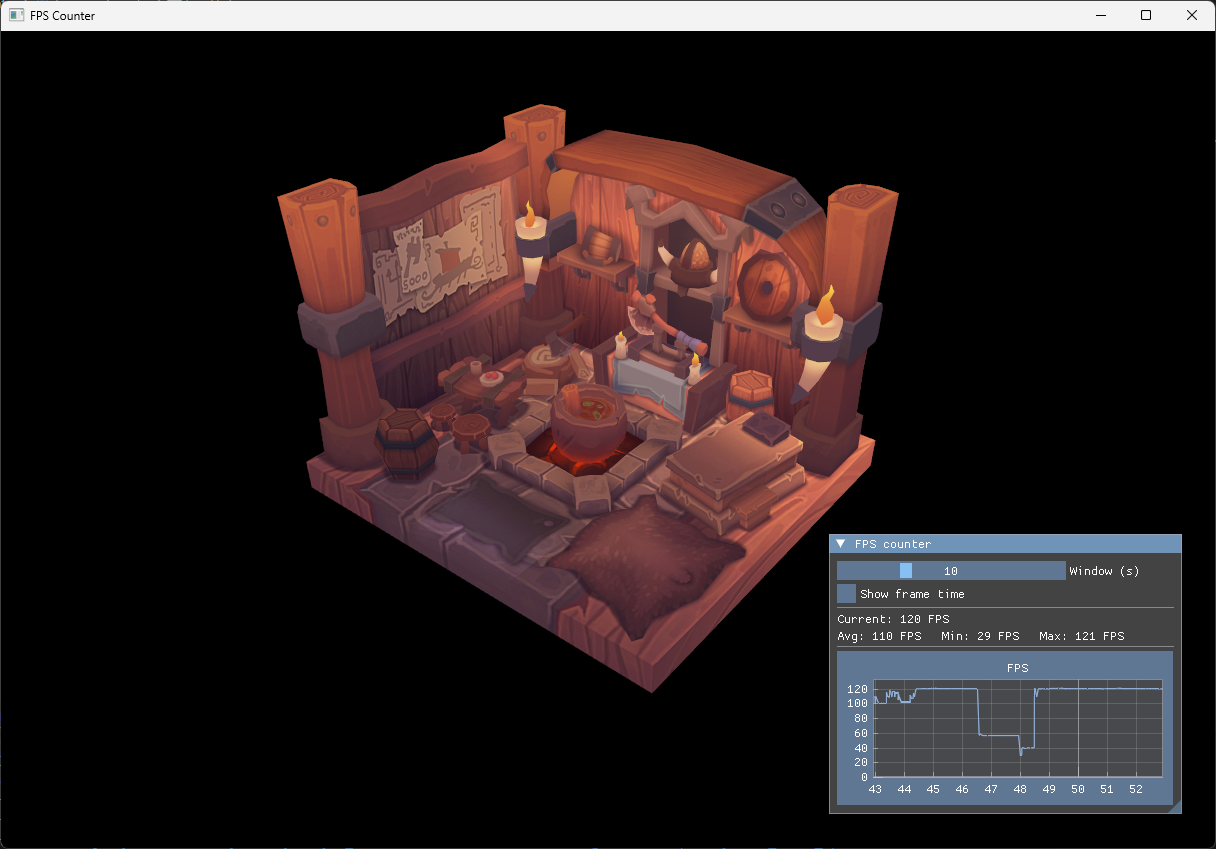
The console shows the usual startup messages and no new validation errors. Common issues at this step:
- The graph frame and axes appear but no line is drawn: the
Specpassed toPlotLineGwas zeroed. The binding wrappers handle this by using a defaultSpecwhen the parameter is omitted, so this only happens if you pass a customSpec{}. See “The Spec trap” in step 38. - The line is a flat invisible line at the bottom: the Y-axis range was crushed by an outlier spike. The smoothed framerate from
im.GetIO().Framerateprevents this; if you switch back to raw1.0 / delta, the first few frames will spike to thousands of FPS and wreck the auto-range.