38 - ImPlot
ImGui gives us widgets, but plotting real data with it is painful: every chart is hand-drawn lines, axes, ticks and labels. ImPlot fixes that. It is a plotting library that sits on top of ImGui, in the same immediate mode spirit, and brings ready-made plots, subplots, drag tools, colormaps and a time axis. The demo window alone covers most of the API, so this step focuses on wiring ImPlot in and opening that demo.
The full source for this step lives in src/38_implot/main.odin, the ovk wrapper in libs/ovk/implot.odin and the binding in libs/implot.
References:
- ImPlot - the original C++ library.
- cimplot - the C API of ImPlot, which the binding wraps.
- Rebuilding the ImPlot library - how to rebuild the C library for Windows and Linux.
Objectives
- Vendor the ImPlot binding into
libs/implotand build its C library. - Create the ImPlot context alongside the ImGui context.
- Draw the ImPlot demo window on top of the viking room.
Concepts
ImPlot draws through ImGui
ImPlot has no renderer of its own. It computes points, axes and labels, then hands them to the current ImGui window’s draw list. That is why this step needed almost no Vulkan work: the ImGui integration from step 37 already renders whatever ImGui records, and ImPlot plots are just ImGui draw commands. The viking room behind stays visible because the ImGui pass uses loadOp = .LOAD, exactly like the demo window before it.
ImPlot has its own context
ImGui keeps global state (windows, widgets, style) in its context. ImPlot does the same, on top of ImGui: plot state, colormaps and the style live in an ImPlot context. CreateContext (libs/implot/implot.odin) creates one and makes it current. You can switch contexts with SetCurrentContext, but a single context for the whole app is the common case.
The contexts nest: an ImPlot context exists inside an ImGui frame. That is why the ImPlot context is created after init_imgui and destroyed before destroy_imgui in destroy_app (src/38_implot/main.odin). Creating it before ImGui exists would leave ImPlot without a host to draw into.
The binding wraps a C library
Like libs/imgui, implot.odin is not a pure Odin implementation. It wraps the C API of ImPlot - cimplot, the C binding generated from implot.h - and links against a static library. The library is compiled from cimplot.cpp plus the implot sources, once per platform, and dropped next to the binding: implot_windows_x64.lib on Windows, libimplot_linux_x64.a on Linux. Both are committed, so the project compiles out of the box. Rebuilding is only needed when upgrading; the procedure is in Rebuilding the ImPlot library.
The binding is written by hand, not generated. ImPlot’s public API is small enough that a curated binding beats an auto-generated one: the C API exposes every template variant of PlotLine for every integer type (S8, U8, S16, …), and most of those are noise. The binding keeps the double, float and getter variants, which cover the realistic cases, and skips the internal API (ticks, axes internals, the ImPool/ImVector machinery). It follows the naming of imgui.odin: the ImPlot_ prefix is stripped from functions, ImPlot from types, and flag types use the Flags :: bit_set[Flag; i32] pair convention (libs/implot/implot.odin).
The Spec trap: a zeroed Spec is not the default
Every PlotLine variant takes an ImPlotSpec_c by value. In C++, ImPlotSpec has a constructor that fills the fields with IMPLOT_AUTO = -1, which tells ImPlot to use the style defaults (line color, weight, marker, …). The binding mirrors the struct layout faithfully, but a zeroed Spec{} in Odin is all zeros, not all -1: LineColor becomes (0, 0, 0, 0) (fully transparent) and LineWeight becomes 0. The result is a line that ImPlot draws with zero alpha and zero thickness - in other words, invisible. The plot frame and axes show up fine, but the data line never appears.
The fix lives in the binding, not the application code. Spec_ImPlotSpec (libs/implot/implot.odin) calls the C constructor and returns a ^Spec with the proper defaults. The binding keeps a single default_spec global, created lazily on first use, and the PlotLine_* wrappers pass it to the C function when the caller omits the spec parameter. So implot.PlotLine_doublePtrdoublePtr(label, xs, ys, count) just works; passing a custom ^Spec is still supported for the cases where you want to tune line color or weight.
Implementation
libs/implot
The vendored folder mirrors libs/imgui: implot.odin, the prebuilt static libraries and a build/ folder with the rebuild scripts and their documentation. The foreign import block at the top of implot.odin selects the library per OS and architecture, and the C++ standard library is required on Linux and macOS, same as the ImGui binding.
The binding defines the types you pass around: Point, Range, Rect for plot coordinates (libs/implot/implot.odin), the Spec struct that tunes a plot item (libs/implot/implot.odin), the Style struct (libs/implot/implot.odin), and the enums for flags, colors, markers and colormaps. The shared ImGui types (Vec2, Vec4, TextureRef, DrawList, …) are imported from the imgui package rather than redefined, so both bindings agree on layout.
libs/ovk/implot.odin
The ovk wrapper is deliberately small, because ImPlot needs so little setup. It only owns the ImPlot context pointer:
ImPlot :: struct {
	ctx: ^implot.Context,
}
init_implot (libs/ovk/implot.odin) creates the context and returns it through the ovk Error protocol, like the rest of the framework. destroy_implot (libs/ovk/implot.odin) destroys it and clears the pointer. There is no frame helper: ImPlot draws through ImGui’s frame, so imgui_new_frame and cmd_draw_imgui already cover it.
src/38_implot/main.odin
The changes over step 37 are minimal:
import implot "../../libs/implot"(src/38_implot/main.odin).- The
Appstruct gains animplotfield of typeovk.ImPlot(src/38_implot/main.odin). - The window title becomes “ImPlot” (
src/38_implot/main.odin).
In init_app, after init_imgui, the ImPlot context is created and becomes current:
app.implot = ovk.init_implot() or_return
In destroy_app, the ImPlot context goes away before the ImGui one (src/38_implot/main.odin), because an ImPlot context lives inside the ImGui context:
ovk.destroy_implot(&app.implot)
ovk.destroy_imgui(&app.imgui)
In the render loop, the demo window opens once per frame, right after the ImGui frame starts (src/38_implot/main.odin):
ovk.imgui_new_frame()
implot.ShowDemoWindow(nil)
im.Render()
ShowDemoWindow takes an optional bool* to toggle visibility from the code; nil means the window cannot be closed programmatically, only through its own close button.
That is the whole integration. Every ImPlot call between imgui_new_frame and Render draws into the current ImGui frame, and cmd_draw_imgui renders it all in one pass.
Results
The app opens a window showing the rotating viking room with the ImPlot demo window on top. The demo is worth spending a minute on: it groups the plots by theme - line and scatter plots, bar charts, histograms, heatmaps, pie charts, subplots, drag tools, colormaps - and every sample is interactive. Drag the crosshairs, zoom with the scroll wheel, double-click an axis to fit the data.
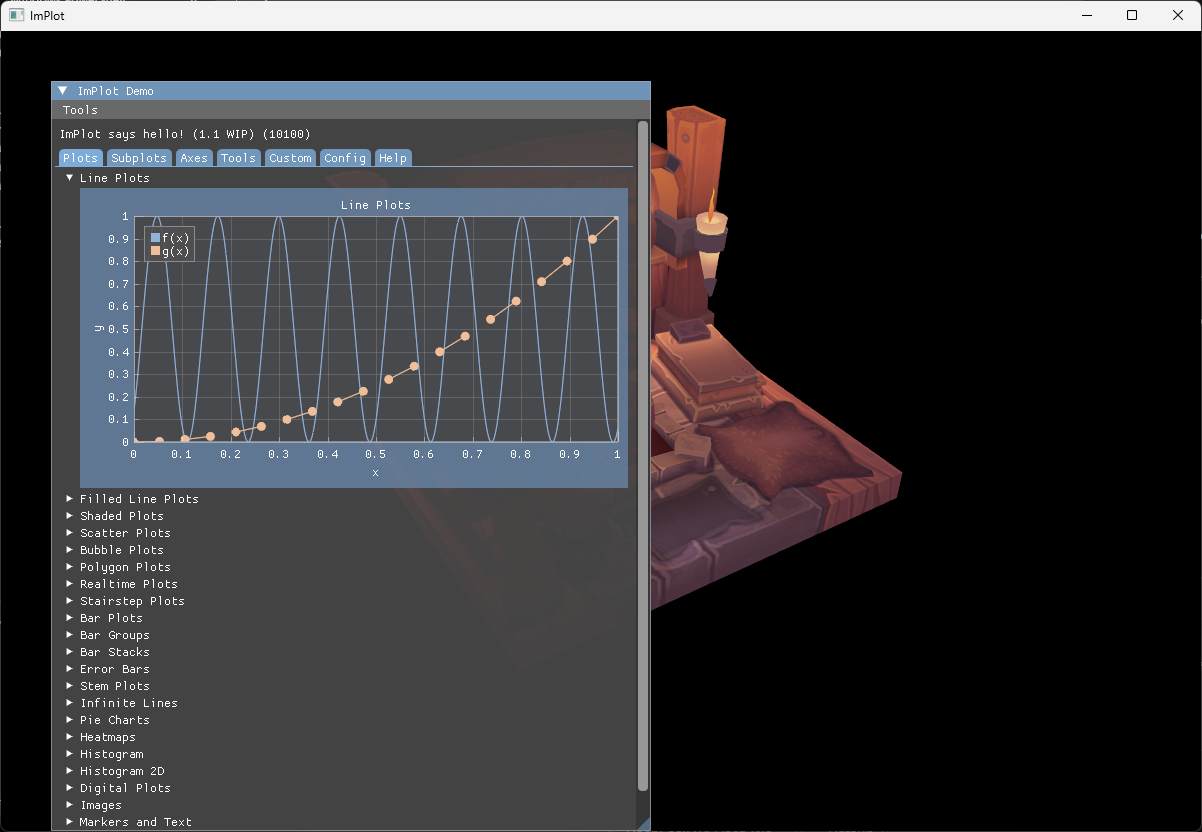
The console shows the usual startup messages and no new validation errors. Common issues at this step:
- A link error mentioning
implot_windows_x64.liborlibimplot_linux_x64.a: the library is missing fromlibs/implot. Rebuild it with the procedure in Rebuilding the ImPlot library. - The app crashes on startup with an ImPlot assert: the ImPlot context was created before the ImGui context, or destroyed after it. Create ImPlot right after
init_imguiand destroy it right beforedestroy_imgui. - The plot area is blank but the window is there: the ImPlot calls happen outside an ImGui frame, or outside a
BeginPlot/EndPlotpair. Every plot must start withBeginPlotand end withEndPlot, both inside the ImGui frame. - The plot frame and axes render but the data line is invisible: a
Spec{}was passed instead of using the default. See “The Spec trap” above - the binding wrappers handle this automatically, but only if thespecparameter is omitted.