14 – Presentation and First Triangle
This is the step where everything finally pays off!! Until now we’ve been assembling pieces - instance, device, swapchain, views, shaders, pipeline, command buffers - and the window has stayed stubbornly blank. Time to wire the main loop: acquire a swapchain image, submit the recorded command buffer, present the result, and repeat every frame. The triangle appears.
The new pieces are all about synchronization. The CPU and the GPU run in parallel, and so do the GPU and the presentation engine. Without something to coordinate them, you’d submit a frame before the previous one finished drawing, or try to present an image the GPU hasn’t finished writing. Vulkan doesn’t guess for you here - you tell it, with semaphores and fences, exactly what waits on what.
The full source for this step lives in src/14_presentation_first_triangle/main.odin.
The corresponding chapters in the Vulkan Tutorial are:
- Khronos version: https://docs.vulkan.org/tutorial/latest/03_Drawing_a_triangle/03_Drawing/02_Rendering_and_presentation.html
- vulkan-tutorial.com version: https://vulkan-tutorial.com/Drawing_a_triangle/Drawing/Rendering_and_presentation
Synchronization is genuinely one of the trickier parts of Vulkan, not obvious at first glance and easy to get wrong. If you’re curious, I’d suggest reading these articles:
- Swapchain Semaphore Reuse: https://docs.vulkan.org/guide/latest/swapchain_semaphore_reuse.html
- Understanding Vulkan Synchronization: https://www.khronos.org/blog/understanding-vulkan-synchronization
What’s new, in one glance
create_semaphore/create_fence- the two synchronization primitives a frame needs, with their matchingvk.Destroy*calls in cleanup.wait_for_fence/reset_fence- thin wrappers overvk.WaitForFences/vk.ResetFences. Fences don’t reset themselves.acquire_next_image- waits on the previous frame, resets the fence, callsvk.AcquireNextImageKHR, and tolerates the two non-fatal results (SUBOPTIMAL_KHR,ERROR_OUT_OF_DATE_KHR).submit_command_buffer- builds avk.SubmitInfothat waits on the acquire semaphore, sends the command buffer, signals a render-finished semaphore, and ties the whole submit to the draw fence.queue_present-vk.QueuePresentKHR, waiting on the render-finished semaphore before actually putting the image on screen.wait_idle_device-vk.DeviceWaitIdle, called once after the loop exits so cleanup doesn’t tear down objects the GPU is still using.mainstops discarding the graphics queue fromcreate_logical_device- we need it both to submit and to present.
Semaphores vs fences, the short version
Both are synchronization objects you signal and wait on. The distinction is who sees them:
- Semaphores are GPU-side. They coordinate work between queues, or between a queue and the presentation engine. The CPU can’t query them.
- Fences are CPU-visible. The CPU waits on a fence to know the GPU has finished something. That’s how we know “the previous frame is done, safe to record into the command buffer again”.
A frame uses both: a semaphore to make the GPU wait for the acquired image before drawing, another to make presentation wait for the draw to finish, and a fence so the CPU knows when it’s safe to reuse the command buffer for the next frame.
This is also why the draw fence is created with {.SIGNALED}. On the very first iteration there’s no previous frame to signal it, so without the flag vk.WaitForFences would block forever on frame one. Pre-signaling it makes “wait for the last frame” a no-op the first time through, which is exactly what we want.
One acquire semaphore, one submit semaphore per swapchain image
Most Vulkan tutorials show two semaphores total - one for acquire, one for render finished - reused across frames. That works for a “one frame in flight” loop like ours, but the Khronos guide on swapchain semaphore reuse explains why it’s a footgun the moment you add a second frame in flight: a semaphore waited on by vk.QueuePresent has to be unique per swapchain image, otherwise you can deadlock on a stale signal.
I followed that guide here even though we only run one frame at a time, because it costs nothing and it’s the shape we’ll need next step. So:
acquire_semaphore := create_semaphore(device)
// ...
submit_semaphores := make([]vk.Semaphore, len(swap_chain_images))
defer delete(submit_semaphores)
for i in 0 ..< len(submit_semaphores) {
	submit_semaphores[i] = create_semaphore(device)
}
The acquire semaphore stays single (it’s waited on inside submit_command_buffer, on the GPU, before any present), while the per-image submit semaphores are indexed by the image we’re about to show. The slice is defer deleted for its backing storage, and each handle gets its own vk.DestroySemaphore in the cleanup loop - the same own-handles-then-free-storage pattern as the image views back in step 09.
The Odin-specific bit: local_foo := foo everywhere
If you’ve been reading the code, you’ve noticed a lot of this:
local_fence := fence
vk_check(vk.WaitForFences(device, 1, &local_fence, true, max(u64)), "Failed to wait for fence!")
Vulkan’s pointer-taking calls want a ^T to a value, and Odin is strict about taking the address of a procedure parameter - directly writing &fence where fence is a parameter produces a pointer the compiler considers potentially aliased in ways it can’t prove safe. The conventional workaround is to copy the parameter into a local and take the address of that. It looks redundant, but I think it’s a standard in Odin world, and once you’ve written it twice you stop noticing.
The same trick shows up for command_buffer, swap_chain, acquire_semaphore, render_finish_semaphore and the image index inside queue_present. They’re all single values that need to be passed to Vulkan as a pointer-to-one. The array of one alternative ([1]vk.Semaphore{fence}) also works, but a named local reads better.
Acquire, submit, present: the loop body
Three calls per iteration, in this exact order:
acquire_next_image- wait on the draw fence (previous frame done), reset it, thenvk.AcquireNextImageKHR. This hands us an index into the swapchain image slice and signalsacquire_semaphoreonce the image is actually available - the image isn’t yours to write to until that semaphore fires.record_command_buffer- same proc as step 13, now called every frame with the image and view for the index we just got. The buffer was allocated with.RESET_COMMAND_BUFFER, so re-recording over the previous frame’s content is allowed.submit_command_buffer-vk.QueueSubmitwith aSubmitInfothat says “wait onacquire_semaphoreat theCOLOR_ATTACHMENT_OUTPUTstage, run this command buffer, signalsubmit_semaphores[index]when done, and setdraw_fencewhen the whole submit is finished”.queue_present-vk.QueuePresentKHR, waiting onsubmit_semaphores[index]so the image only goes on screen once the GPU is done writing it.
The waitDstStageMask = .COLOR_ATTACHMENT_OUTPUT is not random. It says “the GPU can do everything up to the start of color output without waiting, but must block at color output until the acquire semaphore is signaled”. That lets the vertex processing of this frame overlap with the presentation of the previous one, which is the whole point of the pipelining.
Tolerating SUBOPTIMAL_KHR and ERROR_OUT_OF_DATE_KHR
vk.AcquireNextImageKHR and vk.QueuePresentKHR are the two calls in the loop that can come back with these instead of .SUCCESS:
SUBOPTIMAL_KHR- the swapchain still works but no longer matches the surface perfectly (a slight resize, usually). Keep going, recreate when you can.ERROR_OUT_OF_DATE_KHR- the swapchain is now invalid. Stop drawing with it and recreate.
We currently don’t recreate the swapchain, so we just tolerate both: a frame may render to a slightly-off surface, and that’s fine for a tutorial. Step 16 (Swap Chain Recreation) is where we come back and actually act on them by rebuilding the swapchain. For now, the important part is to not pass them through vk_check as errors - they’re expected, and crashing on a window resize would be a poor first-triangle experience.
acquire_next_image filters them out before calling vk_check. queue_present currently uses vk_check straight; it’ll be relaxed in the same step 16 pass.
vk.DeviceWaitIdle before teardown
wait_idle_device(device)
One line, easy to miss. After the event loop exits, the GPU is very likely mid-frame: a command buffer is executing, a fence is unsignaled, the presentation engine is holding an image. If we started destroying the command pool or the semaphores right then, validation layers would scream and the driver could crash. vk.DeviceWaitIdle blocks the CPU until the GPU has no pending work. It’s the sledgehammer version - vk.QueueWaitIdle per queue is finer, and waiting on the specific draw fence is finer still - but for cleanup it’s the right tool. Cheap to call once at the end but a bad idea to call every frame.
Cleanup order
Synchronization objects are created from the device, so they go before the device in cleanup - same rule as everything else. Order is the reverse of creation:
if draw_fence != 0 {
	vk.DestroyFence(device, draw_fence, nil)
}
if acquire_semaphore != 0 {
	vk.DestroySemaphore(device, acquire_semaphore, nil)
}
for submit_semaphore in submit_semaphores {
	if submit_semaphore != 0 {
		vk.DestroySemaphore(device, submit_semaphore, nil)
	}
}
The 0 guards are the same defensive habit as in every other step. The submit-semaphore loop mirrors the creation loop - one destroy per handle, then the slice’s backing storage is freed by the defer delete in main.
Test it
Run the executable from the src/14_presentation_first_triangle directory. The usual setup chain prints as before, with three new lines after the command buffer:
Acquire complete semaphore... OK
Submit finish semaphores (3)... OK
Draw fence... OK
the (3) being the swapchain image count your surface reported. Then Vulkan initialization completed with success! and the window opens.
And this time, the window isn’t blank. After all those steps of plumbing, here it is:
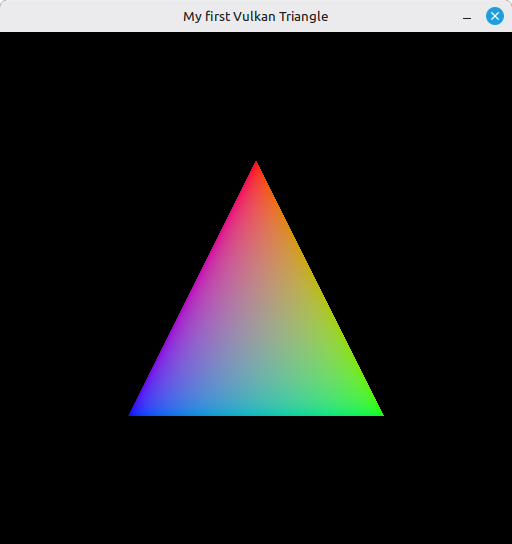
A single colored triangle on a black background, the vertex positions and colors hardcoded in the shader from step 10. Resize the window and the triangle stays the same size - we don’t rebuild the swapchain yet, so the rendered area no longer matches the window. That’s step 16.
If validation prints something about a semaphore being in use at destroy time, double-check the wait_idle_device call: it has to run before any vk.Destroy* on the synchronization objects, otherwise the GPU may still be referencing them.
What’s next
We have a triangle - but the loop only keeps one frame in flight, which means the GPU is idle most of the time while the CPU records the next buffer. The next step introduces multiple frames in flight: more command buffers, more fences, more semaphores, so the GPU always has work queued up while the CPU prepares the next frame. That’s 15 - Frames In Flight.