34 - Debug Names
Vulkan objects are handles - numbers or pointers the driver uses internally. When something goes wrong, the validation layers or a capture tool like RenderDoc will tell you “buffer X has a problem”, but X is just a raw handle value. You can’t tell which buffer that is without cross-referencing handles with your own code. The VK_EXT_debug_utils extension lets you give each object a human-readable name, so error messages and tools show "My Vertex Buffer" instead of 0xabcd1234. It also supports labelling sections of the command buffer with begin/end markers, making captures much easier to navigate.
The extension was already enabled in step 03 for the debug messenger. We just never used the naming part of it.
The full source for this step lives in src/34_debug_names/main.odin and the new library file libs/ovk/debug_names.odin.
Objectives
- Add a reusable
ovk.set_debug_nameAPI that wrapsvkSetDebugUtilsObjectNameEXT. - Name every significant Vulkan object at creation time in
init_app. - Add
cmd_begin_debug_label/cmd_end_debug_labelwrappers for command buffer regions. - Use labels in
record_command_bufferto separate the image transitions from the render pass.
Concepts
Debug names are free at runtime
Calling vkSetDebugUtilsObjectNameEXT has near-zero cost. It stores a string in the driver’s debug data structures, and when the validation layers or a capture tool query it, they get the name back. There is no performance impact on the rendering path. In a release build you can skip the calls entirely if you want, but even in debug the cost is negligible.
What gets a name
Every Vulkan object type can be named: devices, instances, queues, buffers, images, pipelines, command buffers, you name it. The API takes an object type enum and a u64 handle, so you can name anything you can get a handle for.
The ovk wrapper overloads set_debug_name per type so you never have to pass the enum or extract the handle yourself. The overloaded proc pattern in Odin lets all these functions share the same name and the compiler picks the right one based on the argument types:
set_debug_name :: proc {
    set_debug_name_device,
    set_debug_name_instance,
    set_debug_name_buffer,
    set_debug_name_image,
    // ... one per type
}
Command buffer labels
vkCmdBeginDebugUtilsLabelEXT and vkCmdEndDebugUtilsLabelEXT insert markers into the command stream. Tools like RenderDoc show them as expandable sections in the command buffer viewer, so you can collapse “Transition images” and jump straight to “Rendering”. Each label has a name and a color, which helps visually separate regions.
Implementation
libs/ovk/debug_names.odin
The internal workhorse is set_debug_name_internal:
set_debug_name_internal :: proc(device: vk.Device, object_handle: u64,
                                object_type: vk.ObjectType,
                                object_name: string) -> (err: Error) {
    cname := strings.clone_to_cstring(object_name)
    defer delete(cname)

    debug_info := vk.DebugUtilsObjectNameInfoEXT {
        sType        = .DEBUG_UTILS_OBJECT_NAME_INFO_EXT,
        objectHandle = object_handle,
        objectType   = object_type,
        pObjectName  = cname,
    }

    check(vk.SetDebugUtilsObjectNameEXT(device, &debug_info),
          "Failed to set the debug object name") or_return
    return
}
It converts the Odin string to a cstring, builds the VkDebugUtilsObjectNameInfoEXT struct, and calls the extension function. The @(private = "file") attribute keeps it internal - nobody outside this file needs to call it directly.
Each overload extracts the native handle from the ovk wrapper struct and dispatches to set_debug_name_internal. Dispatchable handles (device, instance, physical device, queue, command buffer) need u64(uintptr(...)) because they’re pointers internally. Non-dispatchable handles (buffer, image, etc.) just need u64(...) because they’re already integer-like:
// Non-dispatchable: straight u64 cast
set_debug_name_buffer :: proc(device: ^Device, buffer: ^Buffer, object_name: string) -> (err: Error) {
    set_debug_name_internal(device.vk_device, u64(buffer.vk_buffer), .BUFFER, object_name) or_return
    if buffer.vk_device_memory != 0 {
        memory_name := strings.concatenate({object_name, " (memory)"})
        defer delete(memory_name)
        set_debug_name_internal(device.vk_device, u64(buffer.vk_device_memory),
                                .DEVICE_MEMORY, memory_name) or_return
    }
    return
}

// Dispatchable: uintptr first
set_debug_name_queue :: proc(device: ^Device, queue: ^Queue, object_name: string) -> (err: Error) {
    return set_debug_name_internal(device.vk_device, u64(uintptr(queue.vk_queue)),
                                   .QUEUE, object_name)
}
Some overloads go further. set_debug_name_buffer and set_debug_name_image also name the associated VkDeviceMemory. set_debug_name_graphics_pipeline names the VkPipelineLayout too. This means one call handles the primary object and its most important sub-objects, without you having to think about it.
The command buffer label helpers are straightforward wrappers:
cmd_begin_debug_label :: proc(command_buffer: ^Command_Buffer, label_name: string, color: color4) {
    cname := strings.clone_to_cstring(label_name)
    defer delete(cname)
    begin_info := vk.DebugUtilsLabelEXT {
        sType      = .DEBUG_UTILS_LABEL_EXT,
        pLabelName = cname,
        color      = color,
    }
    vk.CmdBeginDebugUtilsLabelEXT(command_buffer.vk_command_buffer, &begin_info)
}

cmd_end_debug_label :: proc(command_buffer: ^Command_Buffer) {
    vk.CmdEndDebugUtilsLabelEXT(command_buffer.vk_command_buffer)
}
They don’t return errors because setting a label can’t fail at the Vulkan level (it’s a recording command, not a creation command). If you pass a nil command buffer you’ll get a validation error or a crash, but that’s the caller’s responsibility.
Naming objects in init_app
Objects created before the logical device (instance, window surface, physical device) can’t be named at creation time because vkSetDebugUtilsObjectNameEXT needs a VkDevice. They get their name right after the device is created, in order of creation:
ovk.set_debug_name(&app.device, "My Device") or_return
ovk.set_debug_name(&app.device, &app.instance, "My Instance") or_return
ovk.set_debug_name(&app.device, &app.window, "My Window Surface") or_return
ovk.set_debug_name(&app.device, &app.physical_device, "My Physical Device") or_return
ovk.set_debug_name(&app.device, &app.device.graphics_queue, "My Graphics Queue") or_return
ovk.set_debug_name(&app.device, &app.device.compute_queue, "My Compute Queue") or_return
ovk.set_debug_name(&app.device, &app.device.transfer_queue, "My Transfer Queue") or_return
After that, every object gets its name right after creation, before any further work is done with it. The swap chain images, fences, semaphores, and UBO buffers use fmt.tprintf to include an index in the name:
for i in 0 ..< app.swap_chain.nb_frames_in_flight {
    ovk.set_debug_name(&app.device, &app.swap_chain.draw_fences[i],
                       fmt.tprintf("My Draw Fence {}", i)) or_return
    ovk.set_debug_name(&app.device, &app.swap_chain.acquire_semaphores[i],
                       fmt.tprintf("My Acquire Semaphore {}", i)) or_return
}
Labelling the command buffer
In record_command_buffer, the recording is wrapped in two labelled sections:
ovk.cmd_begin_debug_label(command_buffer, "Transition images", ovk.COLOR_PINK)
// ... three transition_image_layout calls ...
ovk.cmd_end_debug_label(command_buffer)

ovk.cmd_begin_debug_label(command_buffer, "Rendering", ovk.COLOR_ORANGE)
// ... begin rendering, bind pipeline, draw, end rendering ...
ovk.cmd_end_debug_label(command_buffer)
In a capture tool these two regions appear as collapsible blocks. The “Transition images” section contains the layout transitions for the three images. The “Rendering” section contains everything that happens during the render pass. The colors are defined in color.odin alongside the other colour constants.
Results
The application runs exactly as before. No visible difference, same viking room, same rotation. The debug names and labels only matter when you look at the app through a debugger or a capture tool.
If you open a frame capture in RenderDoc (see the RenderDoc guide for how to install and capture):
- Every Vulkan object in the Resource Inspector shows its name instead of a raw handle.
- The swap chain images are listed as “My Swap Chain Image 0”, “My Swap Chain Image 1”, etc.
- The command buffer event browser shows the “Transition images” and “Rendering” labelled regions with the assigned colors.
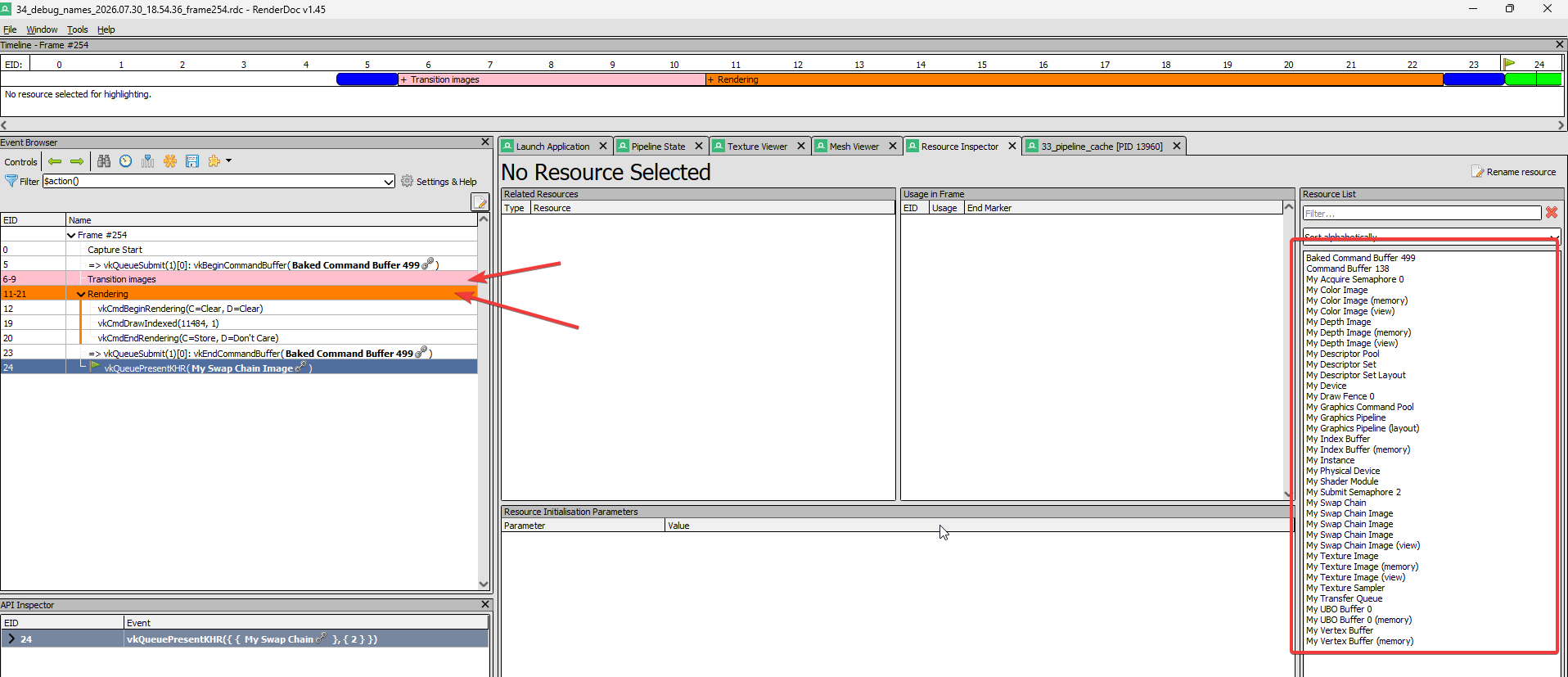
If you’re using Vulkan validation layers with WARNING or ERROR severity, any messages that reference a named object will include the name in the output. For example, instead of Buffer 0x2468ace0 is destroyed but still referenced by command buffer 0x12345678, you’ll see Buffer 'My Vertex Buffer' is destroyed but still referenced by command buffer 'My Graphics Command Buffer'.
Validation layers should report no new warnings. If they do, the most likely cause is a mismatch between the object type enum and the actual handle (easy to get wrong when adding a new overload) or the VK_EXT_debug_utils extension not being enabled (it is, since step 03).
If you see VK_ERROR_EXTENSION_NOT_PRESENT
This shouldn’t happen because the extension was enabled in step 03 and validated since. But if you’re copying this code to a new project and the instance creation fails, make sure VK_EXT_debug_utils is in the instance extension list. Without it, vkSetDebugUtilsObjectNameEXT and the command buffer label functions are not available.